
I received the request for this project from Quality as they have to follow the below steps to export the PO from quality windows to excel.
They need these excels for their quality process.
Previous process steps.
- Manual go to quality windows and the line no where the PO number is from.
- Open the correct quality windows many times we have to find the correct line number because making has 5 lines and packing has 3 lines. Again, each line has anywhere between 7 to 10 different file types. So, totally there are minimum 56 different file types.
- Once the correct line is open. Click on the filter button.

4. Click on the drop down.

5. Select the PO number option.

6. Enter the PO no.

7. Click RUN

8. Filtered PO will be shown, now click the file tab.

9. Select Export to Excel option.

- Now the filtered PO will be shown in a excel.
Click on the save button.

11. Select “More options”.

12. Select “Browse” option

13. Navigate to release folder as shown below.
We have taken example of line M2 and file type we have taken example of “M2 Zebra (ALL FORMULAS – NO OLD SPICE) Making Line Dew Point and beads temperature Record”.
We have to navigate to 6 different folders to reach the destination folder.

14. Create a “New Folder” by clicking the New Folder option.

15. Rename the folder to appropriate name.


16. Open the folder and rename the excel.

17. Click “Save”.

This whole process takes 5 to 7 minutes.
PO export program
Below are the steps for the New process using the PO export program.
The data is exported by the quality windows software is stored in unstructured text file as below.

- Open the program and enter the PO number.
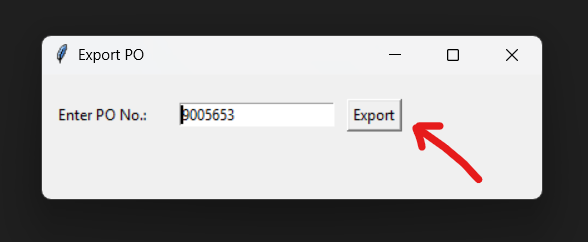
- The program will search all the files in the making and packing, create the folder with PO number in the specified location with specific format.
The file is exported successfully.


This whole process takes 3 to 6 seconds and the previous process took 5 to 7 minutes. This is 98% reduction in time to do the same thing.
Hi, this is a comment.
To get started with moderating, editing, and deleting comments, please visit the Comments screen in the dashboard.
Commenter avatars come from Gravatar.